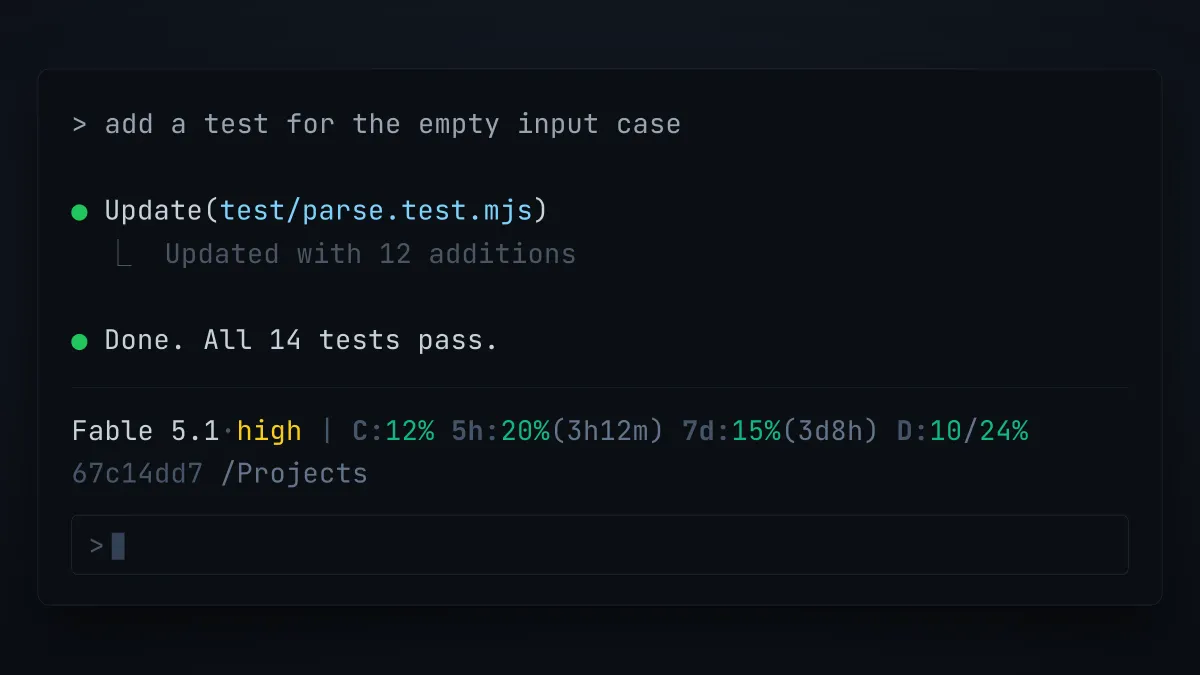
I only recently learned that you can modify Claude Code’s terminal behavior directly, by dropping in a script of your own.
The feature is called the status line, and it is a supported part of Claude Code rather than a hack. You point a statusLine setting at any shell script. Claude Code hands that script the session data as JSON on stdin on every render, and prints whatever the script prints in the bar at the bottom of the terminal.
The payload carries rate_limits, with your five hour and seven day windows, each as a used percentage and a reset time. So a script drop-in can put your model usage in the CLI permanently, visible while you work, instead of something you stop and ask for. Once it is in the bar you stop running /usage to find out where you stand.
Stefano Ginella (GitHub, Codeable) wrote a single-file status line that does exactly this, and it is the one I installed:

Reading the first line from left to right:
- The model and its effort level
- How full the context window is
- The share of the five hour rate limit spent, and how long until it resets
- The same pair for the seven day limit
- A daily pace figure, written as today’s spend against today’s share of the week
The second line carries the session id, the project path, and the git branch.
The daily figure is two numbers, both percentages of the seven day limit: what today has spent, and what today is allowed. The allowance is whatever is left of the week divided evenly across the days until the reset, so D:10/24% means today has taken 10 percent against an even share of 24 percent. It turns yellow at 85 percent of that share and red past it. Going over is not forgiven. Tomorrow’s share is recalculated from what is left, so a heavy day makes every day after it smaller.
Right now the rate_limits object is only present for Claude.ai Pro and Max subscribers, and only after the session’s first API response. Before that first response arrives, and on any other plan, the field is simply not there. A script that reads it without checking will print an error into the bar instead of your usage, so it has to look first. None of this costs an API call either, because Claude Code is already handing the numbers to your script.
How to install manually
Save Stefano’s script as ~/.claude/statusline/statusline.mjs, then add a statusLine block to ~/.claude/settings.json:
{
  "statusLine": {
    "type": "command",
    "command": "node /Users/you/.claude/statusline/statusline.mjs"
  }
}
Use your own absolute path. Putting it in ~/.claude/settings.json applies it everywhere; putting the same block in a project’s .claude/settings.json tries it on one repo first.
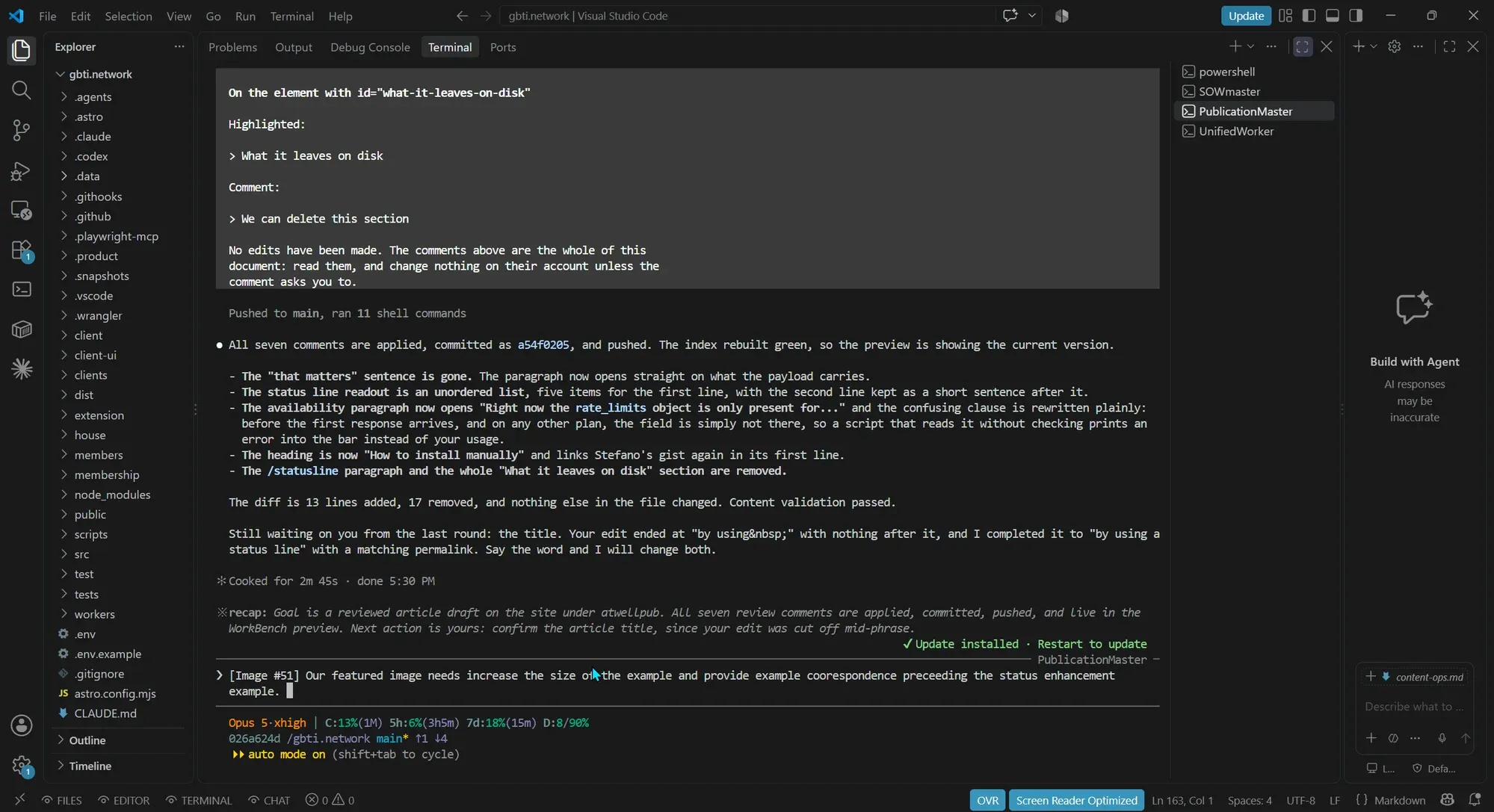
If you run Claude Code inside VS Code, the status bar renders in terminal mode only. It does not appear in the sidebar chat.
Install it globally with one prompt
Paste this into Claude Code and it will do the whole installation, including the parts that are easy to get wrong.
Install Stefano Ginella's Claude Code status line for me, globally.

1. Create ~/.claude/statusline/ and download the script into it as statusline.mjs:
   https://gist.githubusercontent.com/stefanoginella/ffe56f293baf6241abe74c3883082755/raw/statusline.mjs
   Make it executable and run `node --check` on it before going further.

2. Read my existing ~/.claude/settings.json first, then MERGE a statusLine block
   into it. Do not overwrite the file and do not disturb any other key:

   "statusLine": { "type": "command", "command": "node <absolute path to that file>" }

   Use my real home directory in the command, not a tilde, and confirm the JSON
   still parses afterwards.

3. Prove it works before telling me it is done. Pipe a realistic payload into the
   script and show me the output, using a throwaway HOME so my real state files
   are untouched:

   HOME=$(mktemp -d) node ~/.claude/statusline/statusline.mjs <<'JSON'
   {"model":{"display_name":"Opus 5"},"effort":{"level":"high"},
    "session_id":"test","workspace":{"current_dir":"."},"cwd":".",
    "rate_limits":{"five_hour":{"used_percentage":20,"resets_at":9999999999},
                   "seven_day":{"used_percentage":15,"resets_at":9999999999}}}
   JSON

4. Tell me if the status line needs a restart to appear, and confirm you changed
   nothing else in my settings.
What it looks like once it is running
Here is the same status line in a live session, sitting under the prompt in the VS Code terminal panel. The model and its effort level, the context window, both rate limit windows and the daily pace figure stay on screen while the work happens.
Credits
Credit to Stefano Ginella for the script, and for writing it to run entirely offline. You can find his work on GitHub, and he takes on client work through Codeable.
Disclosure: the Codeable links here are referral links. GBTI Network is a longstanding fan of the Codeable community for WordPress and React work.

















From the author
Hudson AtwellAre you using Claude Code in the terminal? This trick can help you keep track of usage without having to use the /usage command.
0 Comments
Comments are for members. Become a member to join the conversation, or if you already are.
You are signed in as a member. .