Nano Banana Headshot: Pale Yellow Button-Down


A Nano Banana prompt for a realistic professional LinkedIn headshot: a pale yellow button-down over a navy tee on a dark slate blue-gray background.
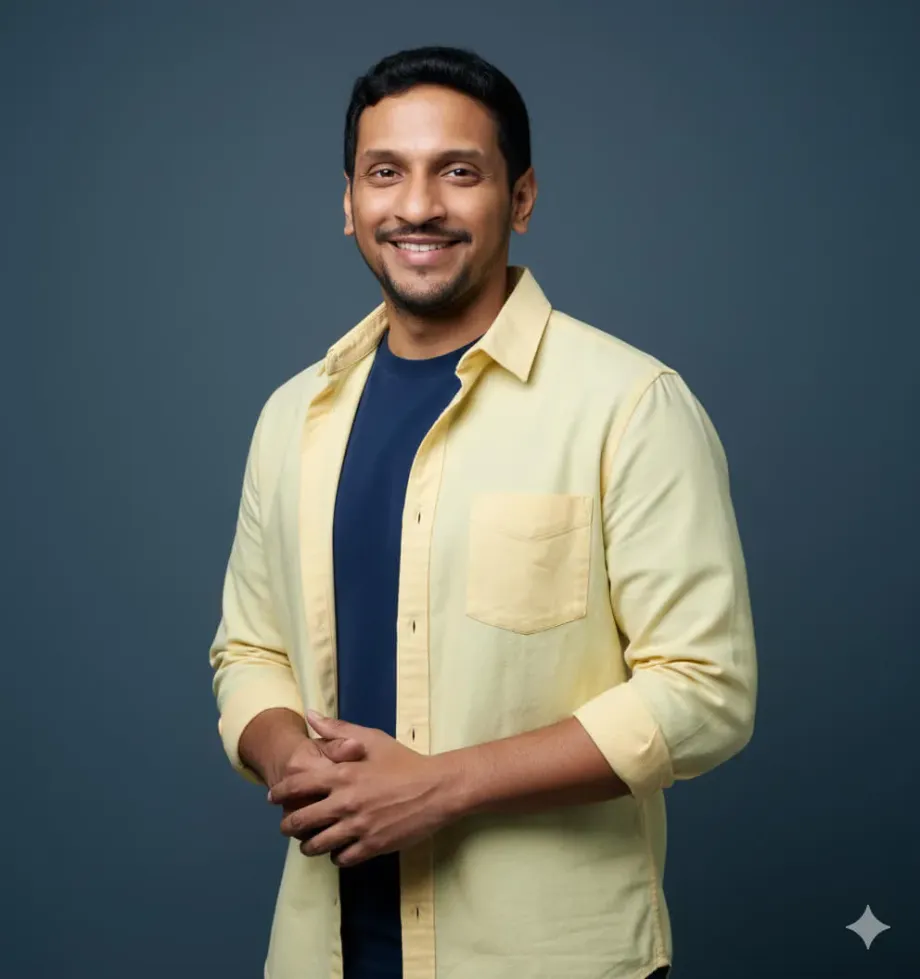
Upload a clear, well-lit photo of yourself to Nano Banana (from the chat box of Google Gemini or Google AI Studio), then paste the prompt below.
For the uploaded picture, generate an image of:
Expression: Warm smile
Clothing: Pale yellow button-down shirt with chest pocket and white buttons, worn over navy blue t-shirt
Clothing shadows: Visible shadows in yellow shirt fabric folds, particularly under collar and along button placket
Lighting: Soft, even frontal lighting
Facial shadows: Face evenly lit with minimal shadows
Background: Dark slate blue-gray background (cool tone), evenly lit with no visible variation
Background shadows: No visible background shadow
Framing: Head and upper torso, hands clasped together visible at waist level
Position: Body angled slightly to left, face turned toward camera, hands clasped at waist
CRITICAL RESTRICTIONS:
- NO multiple backgrounds or layered backgrounds
- NO rounded corners or circular crops
- NO additional background colors or borders
- NO dramatic background gradients, background should be evenly lit or have only minimal, natural lighting variation
- Standard rectangular crop only
- DO NOT add shadows if none exist in the reference image
Upload a clear, well-lit photo of yourself to Nano Banana (from the chat box of Google Gemini or Google AI Studio), then paste the prompt below.

For the uploaded picture, generate an image of:

**Expression:** Warm smile

**Clothing:** Pale yellow button-down shirt with chest pocket and white buttons, worn over navy blue t-shirt

**Clothing shadows:** Visible shadows in yellow shirt fabric folds, particularly under collar and along button placket

**Lighting:** Soft, even frontal lighting

**Facial shadows:** Face evenly lit with minimal shadows

**Background:** Dark slate blue-gray background (cool tone), evenly lit with no visible variation

**Background shadows:** No visible background shadow

**Framing:** Head and upper torso, hands clasped together visible at waist level

**Position:** Body angled slightly to left, face turned toward camera, hands clasped at waist

**CRITICAL RESTRICTIONS:**

-   NO multiple backgrounds or layered backgrounds
-   NO rounded corners or circular crops
-   NO additional background colors or borders
-   NO dramatic background gradients, background should be evenly lit or have only minimal, natural lighting variation
-   Standard rectangular crop only
-   DO NOT add shadows if none exist in the reference image
Get the weekly digest
Never miss content by subscribing to our digest. Subscribing is completely free.
You are signed in. Edit Notification Settings
Follow the GBTI Network
Get more content like this. Follow us on your favorite platforms for updates, news, and community discussions.
From the author
Naresh DevineniThis is the pale yellow button-down look from my set of LinkedIn headshot prompts. Upload a clear photo, paste the prompt, and Nano Banana keeps your face while restyling the outfit, lighting, and background into a pale yellow button-down over a navy tee on a dark slate blue-gray background. If the first result drifts, regenerate once or twice; small tweaks to the background line have the biggest effect.
0 Comments
Comments are for members. Become a member to join the conversation, or if you already are.
You are signed in as a member. .